
Companies House identity-verification scams: what every director needs to know

Companies House identity-verification scams: what every director needs to know
Fraudsters are exploiting a genuine legal requirement to steal directors’ identity and financial information. Here is how to recognise the warning signs and respond safely.
Company directors are being targeted by convincing phishing emails that impersonate Companies House and demand urgent identity verification. The messages may copy official wording, branding and security advice, but their real purpose is to persuade recipients to disclose passport details, financial information or authentication credentials.
Why this scam is particularly convincing
The fraud works because it is built around a real change in company law. Identity verification became a legal requirement from 18 November 2025, with existing directors completing the process according to the due date for each role during a 12-month transition period. That creates uncertainty—and an opportunity for criminals to manufacture urgency.
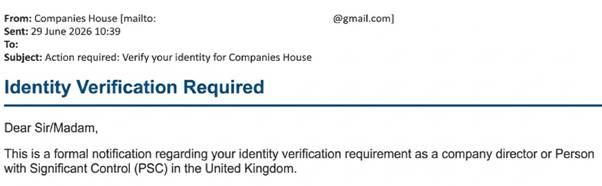
Known scam messages have arrived from Gmail accounts and used phrases such as “formal notification”, “official government service portal” and “prepare your government-issued ID”. Some even include an “important security note” advising recipients to use an official GOV.UK domain, while directing them to a fraudulent verification link.
Five warning signs directors should check
- The sender is wrong. Genuine Companies House emails end in “.gov.uk”. A Gmail address or a lookalike domain is a major red flag.
- The message creates pressure. Be wary of threats, short deadlines or instructions to act immediately.
- The link destination does not match. Hoover over links before clicking. If the address is unexpected, do not open it.
- The email asks for sensitive information. Do not provide passport, banking, password, authentication-code or personal-code details in response to an unsolicited message.
- The wording feels slightly wrong. False information, unusual phrases, spelling errors or inconsistent formatting can expose an imitation.
Use a trusted route to verify your identity
Directors can verify directly through GOV.UK One Login or through an Authorised Corporate Service Provider (ACSP), such as an accountant or solicitor registered with Companies House and supervised for anti-money-laundering purposes. Rather than following an email link, start from the Companies House page on GOV.UK or contact your trusted adviser using details you already hold.
Once verified, you receive a personal code that is unique to you. Keep it secure and share it only with someone you trust to file on your behalf. You need to use the code to connect your verified identity to each company role you hold.
What to do if a suspicious email arrives
Pause before acting and verify the request independently. Do not reply, click a link or open an attachment. If another director, employee or external adviser may have received the same message, alert them promptly so that the threat can be contained.
Immediate action checklist:
- Forward impersonation emails to phishing@companieshouse.gov.uk.
- Do not disclose personal, financial or authentication information.
- Do not open links or attachments.
- Delete the message from all mailboxes, including deleted items, after reporting it.
- If anyone has interacted with the email, inform the business’s IT or cyber-security contact immediately and secure any affected accounts.